How to Fix Keyword Cannibalization in SEO


How do you fix keyword cannibalization? Find the pages competing for the same keyword, then apply one of four targeted fixes based on each page's value: merge them, 301 redirect the weaker one, set a canonical tag, or split the content by search intent. That's the whole playbook.
Here's the thing: most cannibalization isn't a mystery. It's two pages chasing the same search, splitting your authority instead of stacking it. The trick is matching the right fix to the right conflict — not blasting every overlap with the same tool.
You'll learn how to spot the overlap, choose the correct fix, and build habits that stop conflicts from forming again. Let's start with the quick answer, then unpack each move.

How to fix keyword cannibalization: quick answer
Two of your pages are fighting for the same Google ranking, and neither is winning. Frustrating, right?
Knowing how to fix keyword cannibalization comes down to two moves. First, find the pages that compete for the same keyword. Then pick one of four targeted fixes based on what each page is actually worth.
The four fixes, in order of impact:
Consolidate and merge competing pages. When both pages have traffic or backlinks, combine them into one stronger page. This is typically your highest-impact option.
301 redirect the weaker page to the stronger one. A 301 is a permanent redirect that tells search engines a page has moved. Use it when one page clearly dominates.
Set a canonical tag pointing to the preferred URL. A canonical tag tells Google which version to rank when both pages need to stay live.
Differentiate content by search intent. Reshape one page so it answers a different question entirely.
Think of it as triage. You're not applying all four at once — you're matching the right fix to each conflict.
Bottom line: identify the overlap, then choose by page value.
Before diving into the fixes, it helps to understand exactly what keyword cannibalization is and why it matters for your site's SEO performance.
What is keyword cannibalization?
Keyword cannibalization happens when two or more pages on your site target the same keyword and serve the same purpose. Instead of one strong page ranking well, you end up with several weaker ones fighting each other.
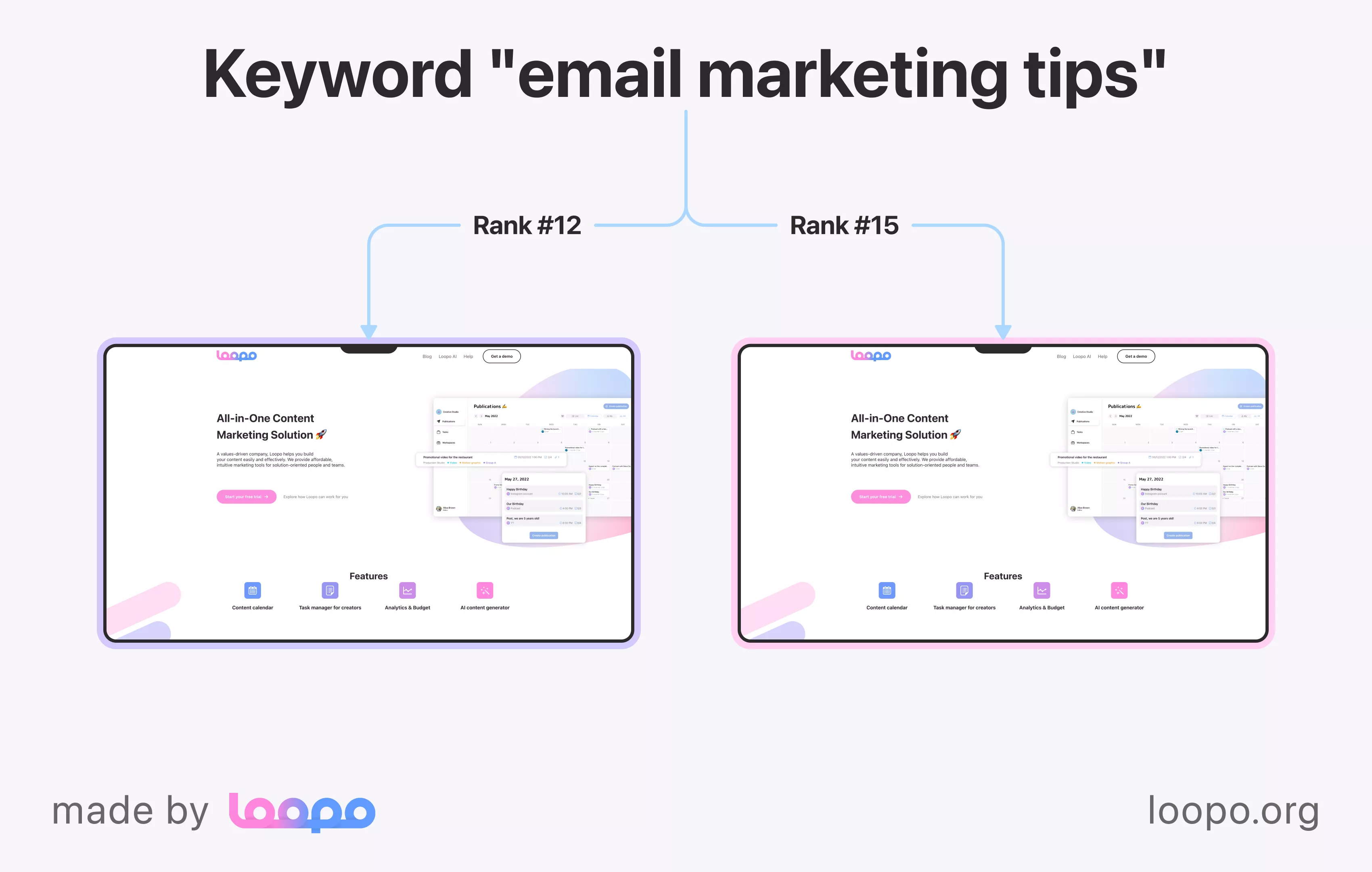
Search engines can't tell which page deserves the top spot. So they hedge, ranking your pages lower than a single focused page would land. Worse, your backlink authority gets fragmented across multiple weaker pages instead of concentrating on one. That split is the real cost.
A quick comparison helps. Say you publish two blog posts both targeting "email marketing tips." They cover nearly identical ground and chase the same reader. That's cannibalization.
Don't confuse this with two related problems, though. Duplicate content means two pages have identical or near-identical text. Content overlap means pages address similar topics without targeting the exact same keyword and intent. Cannibalization is narrower: same keyword, same intent, same site. Two pages can have completely different wording and still cannibalize each other if they chase the same search.
Why does this distinction matter? Because each problem needs a different fix, and mislabeling the issue wastes your time.
That said, not every case of pages sharing a keyword is worth fixing — context matters.
Is keyword cannibalization always harmful?
No. Cannibalization only hurts when two pages chase the same high-intent keyword with the same user purpose.
Pages can share a keyword and still play nice. The deciding factor is intent. An informational blog post explaining "what is content marketing" and a transactional service page selling content marketing can coexist, because they serve different reader needs.
So when does it sting? When both pages want the same thing from the same searcher, your SEO authority splits and rankings drop.
Bottom line: same intent, real problem; different intent, typically fine.
Once you know cannibalization is a real problem for a given keyword, the next step is finding all the affected pages across your site.
How to identify keyword cannibalization issues
You can't fix what you can't see. Four methods surface the overlap fast, and combining two of them gives you the clearest picture.
Start with Google Search Console. Open the Performance report, filter by a target query, then switch to the Pages tab. If more than one URL pulls clicks and impressions for that same query, you've likely found a conflict worth investigating.
Next, run a quick site: operator search. Type site:yourdomain.com "your keyword" into Google. Any time several similar pages show up for one term, that's a cannibalization flag you can confirm later.
Third, keep a keyword mapping spreadsheet. Assigning one keyword and one intent per URL makes overlap obvious at a glance, before it ever costs you rankings.
For bigger sites, dedicated SEO tools speed things up. Semrush has a built-in Cannibalization Report, and Ahrefs offers a "Multiple URLs Only" filter inside its Organic Keywords report that isolates every term where two of your pages compete. Pairing those with keyword clustering tools helps you group queries by intent.
Knowing how to find and fix keyword cannibalization issues starts here. Google Search Console is the fastest free starting point, so let's walk through exactly how to use it step by step.
Using Google Search Console to spot duplicates
Google Search Console gives you a three-click answer.
Open the Performance report. Filter by your target query, then click over to the Pages tab. Now you'll see every URL earning impressions and clicks for that one term.
If two pages each pull meaningful traffic for the same query, you've spotted the split. That's cannibalization showing up directly in the data. Sort by impressions so you know which conflict to tackle first.
Search Console won't tell you which page to keep, but it shows you exactly where to look.
Beyond detection, the best long-term defense is a keyword map that prevents these conflicts from forming in the first place.
Building a keyword map to prevent overlap
A keyword map is a living spreadsheet that assigns one primary keyword and one search intent to each URL. Build it with columns for keyword, target URL, intent, page type, and status.
Keep your pages and blog posts on separate tabs. One tab holds high-intent commercial phrases; the other holds informational queries. That split stops you from accidentally pointing a transactional keyword at a blog post and sparking keyword cannibalization.
Before writing anything, do your keyword research and check the map. Already assigned? Update that page instead.
With your cannibalized pages identified, you're ready to apply the right fix — and there are five proven approaches to choose from.
Five ways to fix keyword cannibalization
There are five proven fixes, and learning how to fix keyword cannibalization means matching each one to the page in front of you.
Merge competing pages. When both pages carry traffic or backlinks, combine them into one stronger page. This is your highest-impact move. Backlinko consolidated two cannibalizing articles with a 301 redirect and saw a 466% increase in clicks within eight weeks. Ahrefs built a pillar page from competing URLs and locked in a top 3 position it never reached with separate pages.
301 redirect the weaker page. A 301 permanently sends users and crawlers to one URL. Use it when one page clearly dominates and the other adds little.
Set a canonical tag pointing to the preferred URL. This tells Google which version to rank when both pages must stay live.
Differentiate content by intent. Reshape one page to answer a different question so the two stop competing.
Noindex low-value duplicate pages. A noindex keeps a page live for users but pulls it from search. Never combine noindex with a canonical tag — Google treats that as a mistake and ignores the canonical.
Want all your content organized in one spot so conflicts surface early? Start your free trial and manage all your content in one place.
Knowing the five fixes is useful, but knowing which one to reach for is what makes the difference. Here's a simple decision framework.
When to merge vs. redirect vs. canonicalize
Three questions pick the right fix every time. Ask them in order, and the answer falls out.
If both pages have valuable links or traffic, merge them. If one page clearly dominates, 301 redirect the weaker one. If both pages must stay live, use a canonical tag.
Question | Merge | Redirect | Canonical |
|---|---|---|---|
Both have equity? | Yes | No | Maybe |
One dominates? | No | Yes | No |
Both stay live? | No | No | Yes |
A particularly common and damaging form of cannibalization occurs on commercial landing pages — and it requires its own targeted approach.
How to fix cannibalization on landing pages
This one quietly kills conversions. When two commercial landing pages chase the same transactional keyword, Google may rank the wrong page or rotate between them, sending buyers to a page that doesn't convert.
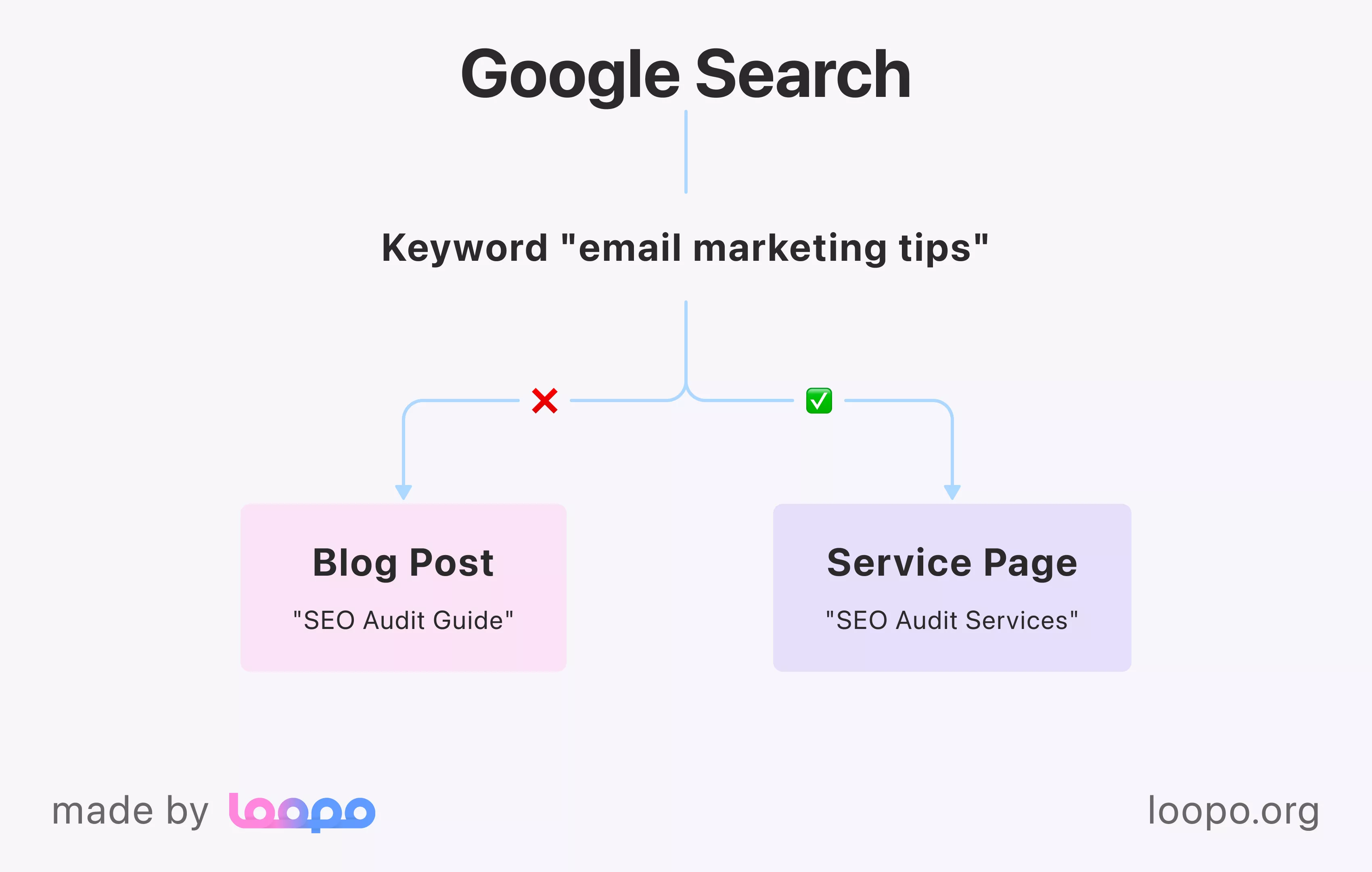
Start by diagnosing which URL Google actually surfaces for your money keywords. Check Search Console, filter by the transactional query, and see which page wins. If a blog post outranks your service page, that's your conversion leak.
The primary fix is differentiating by intent. Take a real case: an "SEO Audit Guide" blog post was outranking the actual SEO audit service page, killing sales. The fix was reshaping the blog post around an informational angle so it stopped competing.
When a competing page must stay live, de-optimize it instead. Remove the target keyword from the title, H1, and meta description so Google focuses ranking signals on your preferred page.
Want a cleaner long-term structure? Build a semantic architecture: one pillar page owns the main commercial keyword while blog posts handle informational queries. Keep your internal link anchor text aligned with each page's intent, too.
Fixing existing cannibalization is important, but building habits that prevent it from recurring will save you far more time in the long run.
Preventive measures to avoid future cannibalization
Fixing pages once is fine. Stopping the problem from coming back is better. Four habits keep your site clean.
First, maintain a live keyword map. This spreadsheet assigns one primary keyword and one intent to every URL, and you update it before each new publication. Without a map, overlap is almost inevitable on any site publishing at scale.
Second, run keyword research before publishing anything. The check takes a minute: does an existing page already own this term? If yes, update that page instead of writing a new one. That single step prevents most future conflicts.
Third, schedule quarterly SEO audits. For most websites, every three months catches new overlap early — add an extra audit after any big content push. Done regularly, it's light maintenance, not a rescue mission.
Fourth, use strategic internal linking to signal which page is authoritative. Reserve a keyword as anchor text for one page only, so Google sees a clear winner. The benefits of SEO compound when your link signals stay consistent, and your organic search analytics will show it.
Even with the right approach, there are a handful of common mistakes that undo good fix work — knowing them in advance saves you from reworking the same pages twice.
Common mistakes when fixing cannibalization
Even a smart fix can backfire. Four mistakes show up again and again, and each one quietly undoes the gains you worked for.
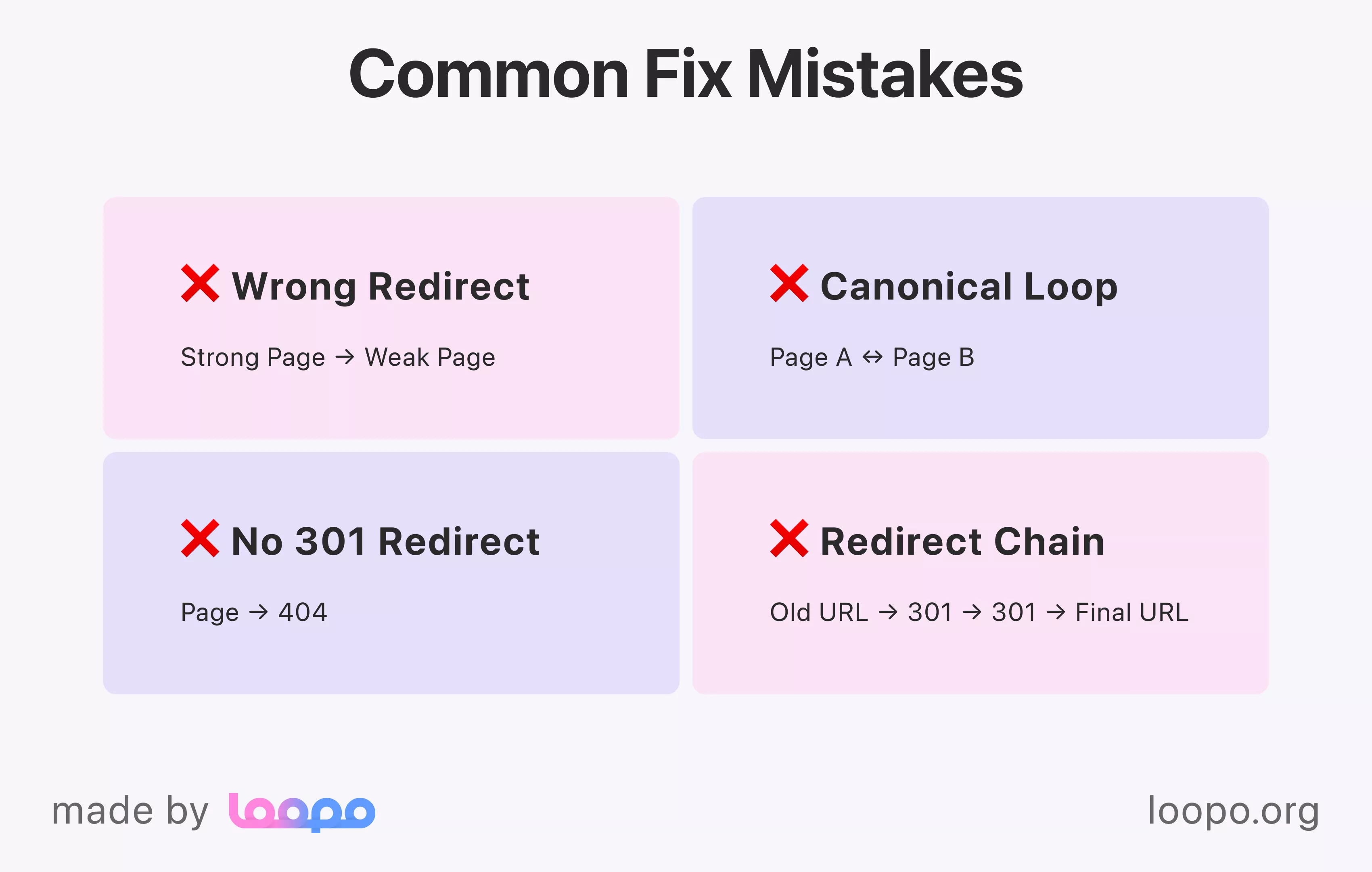
The worst one? Redirecting the wrong page. If you 301 your stronger URL into the weaker one, you hand away its backlinks and ranking history. Always check which page has more domain authority before you point the redirect.
Then there are canonical loops: page A points to page B while page B points back to A. Google sees the circular reference, throws up its hands, and ignores both tags. Every canonical should point straight to one final URL, with no detours.
Deleting pages without redirects is mistake number three. A bare delete creates 404s and dumps all that page's link equity. If a page must go, send a 301 to the page you kept.
Last, don't forget your internal links after a merge. Old links pointing at the redirected URL create redirect chains that weaken your signals. Learning how to fix keyword cannibalization in SEO means updating those links to hit the final destination directly.
Beyond the tactical fixes, the way you structure your overall content process has the biggest long-term impact — here's what we've seen work in practice.
What we've seen work: our experience fixing keyword cannibalization
After auditing dozens of sites, one pattern repeats: cannibalization is a content governance failure first and a technical problem second.
The 301 redirects and canonical tags get all the attention, but in most cases they're treating symptoms. The disease is a process gap. Sites without a keyword map accumulate overlapping pages at scale, almost by default. Nobody checks whether a term is already owned before publishing, so two writers chase the same keyword six months apart and never notice.
Think of it as a paper trail. When every URL has one assigned keyword and one intent, conflicts surface before they ship. When that record doesn't exist, you're cleaning up the same mess every quarter.
The good news? Fixing the process pays off fast. Apply the right method to a clear conflict and you'll often see ranking movement within weeks, not months. A solid content strategy framework does more lasting good than any single redirect, because it stops new conflicts from forming in the first place.
So the real work in fixing keyword cannibalization isn't technical. It's deciding who owns which keyword, and writing that down before anyone hits publish.
Bottom line: fix the process, and the SEO fixes itself.
The bottom line on beating cannibalization
Two pages fighting over one keyword is a fixable problem. You already have the playbook: spot the overlap in Search Console, weigh each page's value, then merge, redirect, canonicalize, differentiate, or noindex.
The tactics matter less than the habit behind them. A keyword map that assigns one term and one intent per URL stops most conflicts before they ship. Run a quick check before publishing, and audit your pages every quarter.
Ready to stop cleaning up the same mess each quarter? Build the process once, and your rankings stop splitting on their own.
For more practical breakdowns on content planning and SEO, the Loopo blog keeps the tactics coming. Start your free trial and manage all your content in one place.
Bottom line: own your keywords on paper, and the rankings follow.